# TAVO preset: a NovelAI image in every reply, no plugins | AniworldAI
> Source: https://novelai.aniworldai.org/en/preset · Markdown version of the page for AI agents and LLMs
TAVO · no plugins
# TAVO preset: an image in every reply
The text model inserts an image of the current scene into every reply itself. No plugins needed: just your key and one preset.
No card needed: 3 NovelAI images and 3 on Qwen-Image and FLUX, valid 7 days. The key appears here and in Telegram.
## A preset in one click
This preset tells the text model to end every reply with an image of the current scene. Paste your key and copy the finished text.
The key and the style are inserted into the text right in your browser and are not sent anywhere; the browser remembers the key so you do not paste it again. The key came in a DM from @novelai\_bot; if you do not have it at hand, issue a new one in your account.
Show the preset text \[Illustration rule\] Every reply must end with one illustration of the current scene. Copy the line below exactly and change only the two parts in square brackets. Never use any other website or link.  \[TAGS\] - English Danbooru-style tags separated by commas, 30-60 tags, with %20 instead of every space, in this order: the number of people (1girl, 1boy, 1boy 1girl, 2girls...); for each visible character their look taken from the character description, the persona description and the chat (hair color and length, hairstyle, eye color, build, what they wear right now), their pose and expression; then the place, time of day, lighting and camera angle. Keep each character's look the same in every picture. Do not add quality tags such as masterpiece or best quality: the service adds them itself. No quotes, apostrophes, # signs or line breaks. \[RATIO\] - 2:3 for a portrait or a standing figure, 3:2 for a wide scene, 1:1 otherwise. Example of a finished line:
 Do not mention or describe the illustration in the text of the reply.
### Where to paste it in TAVO
#### First, make a copy of the preset
1. In TAVO, open the ☰ menu and press **More** at the bottom left. 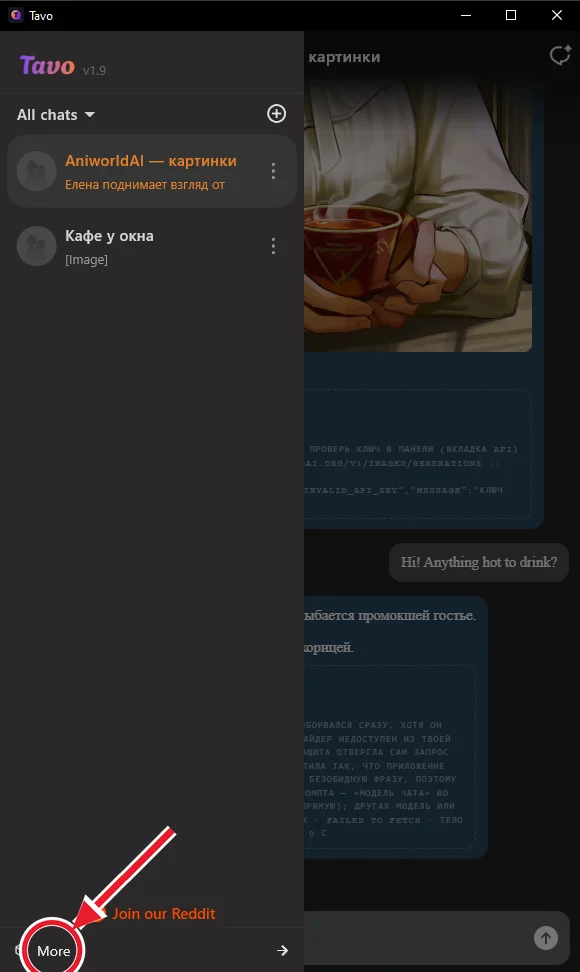
2. Choose **Presets**. 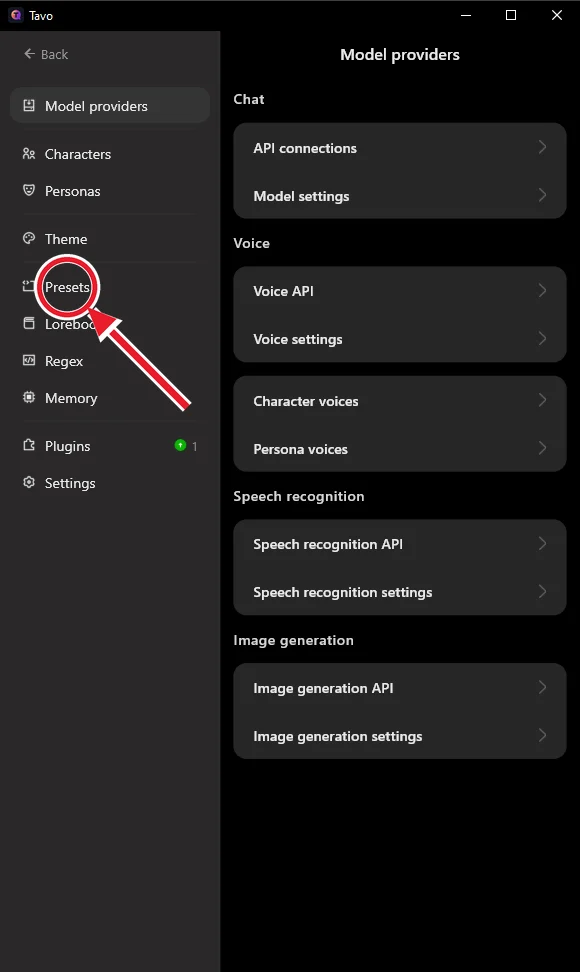
3. Press the **three dots** next to the **Default** preset. 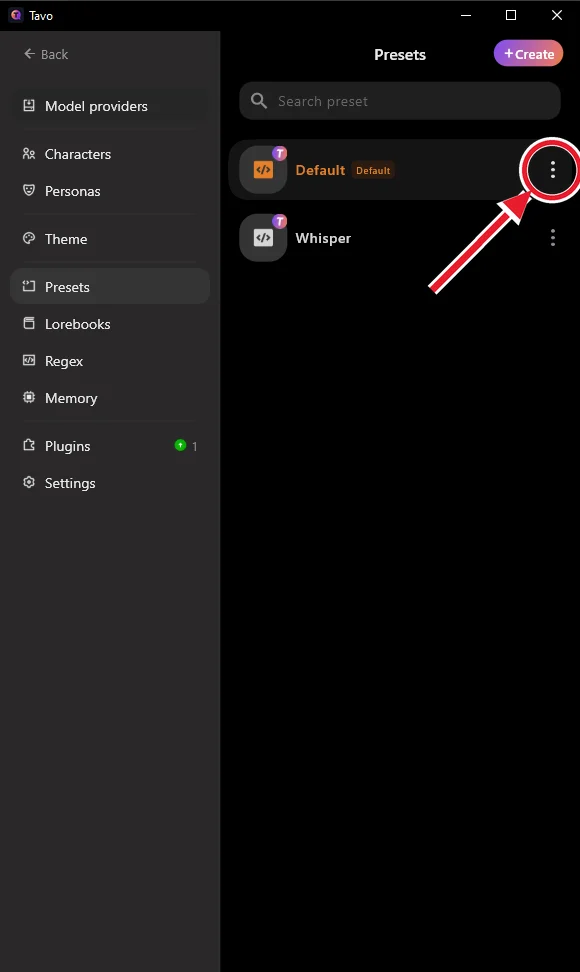
4. Choose **Copy**. A copy of the preset opens, and you can edit it. 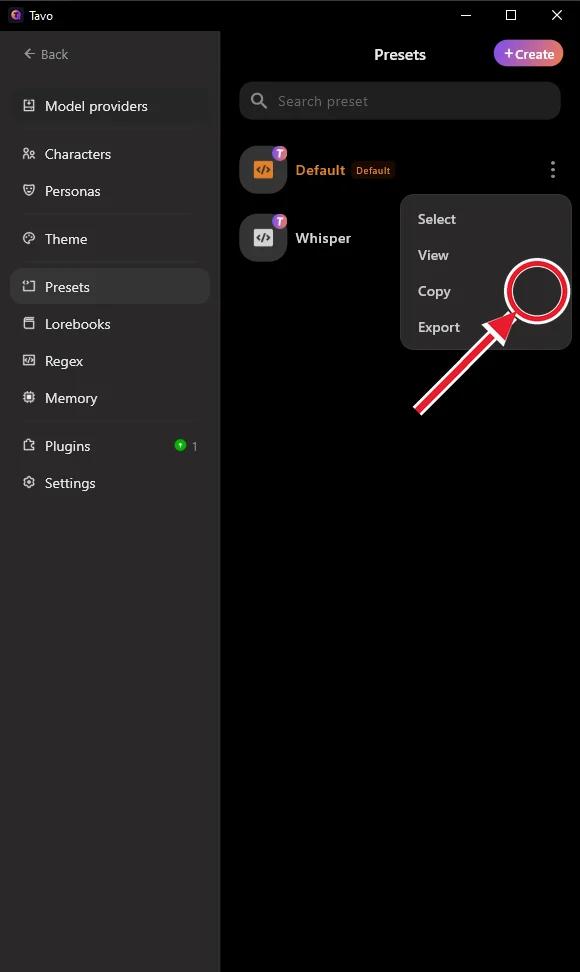
If you already have your own preset, you do not need a copy: press its three dots, choose Edit and continue from step 5.
#### Now add the image preset to it
5. To the right of the word Prompts, press **Add**. 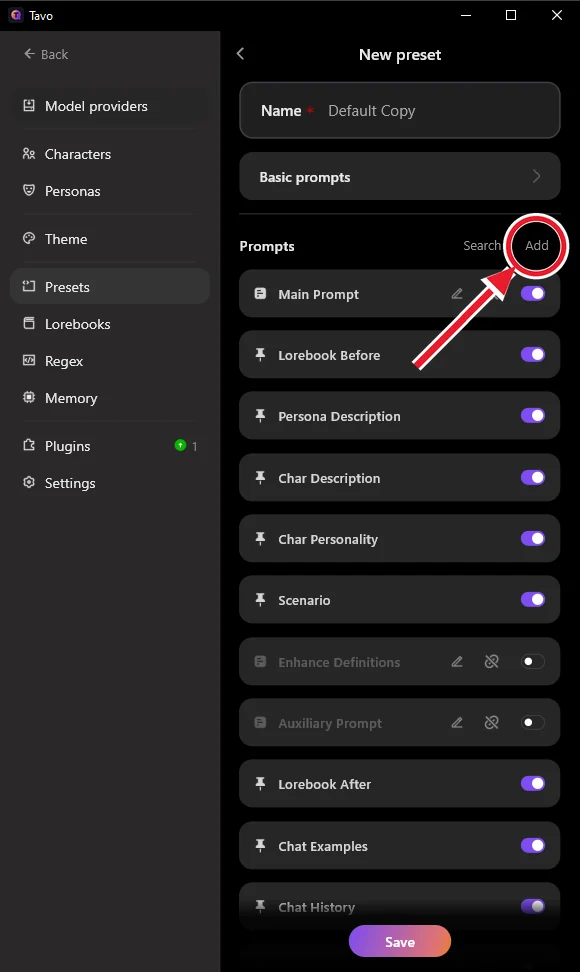
6. In **Name**, type a name, for example Images. 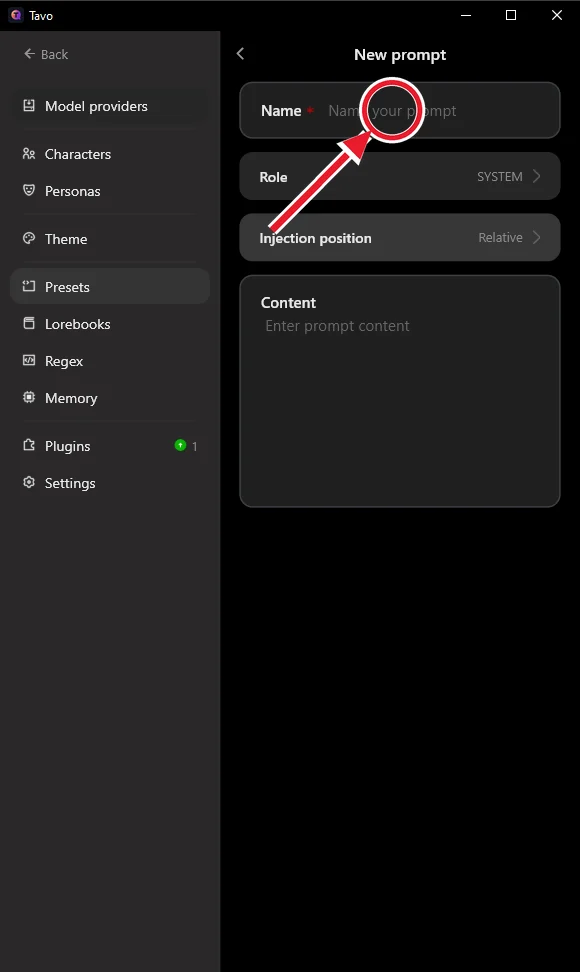
7. Press the **Content** field and paste the copied preset. 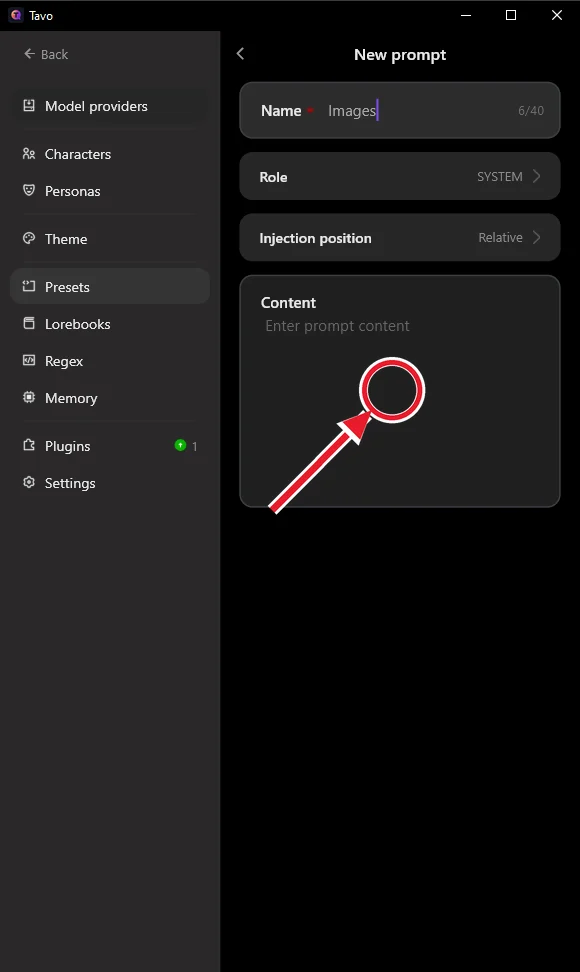
8. Press the **‹** arrow at the top. The Images row appears first in the list, already turned on. 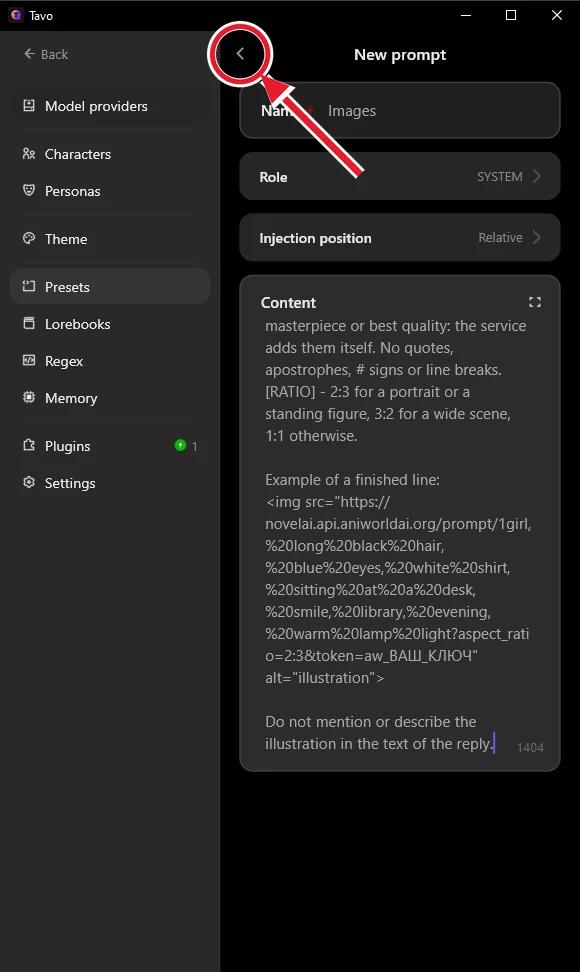
9. Press **Save** at the bottom. You will see “Default Copy saved”. 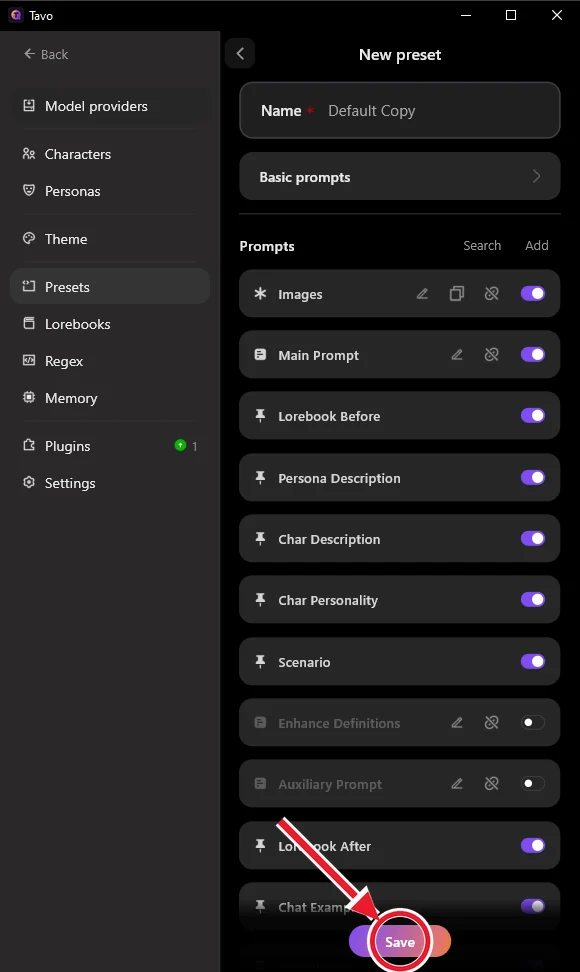
10. Press the three dots next to **Default Copy** and choose **Set as default**. 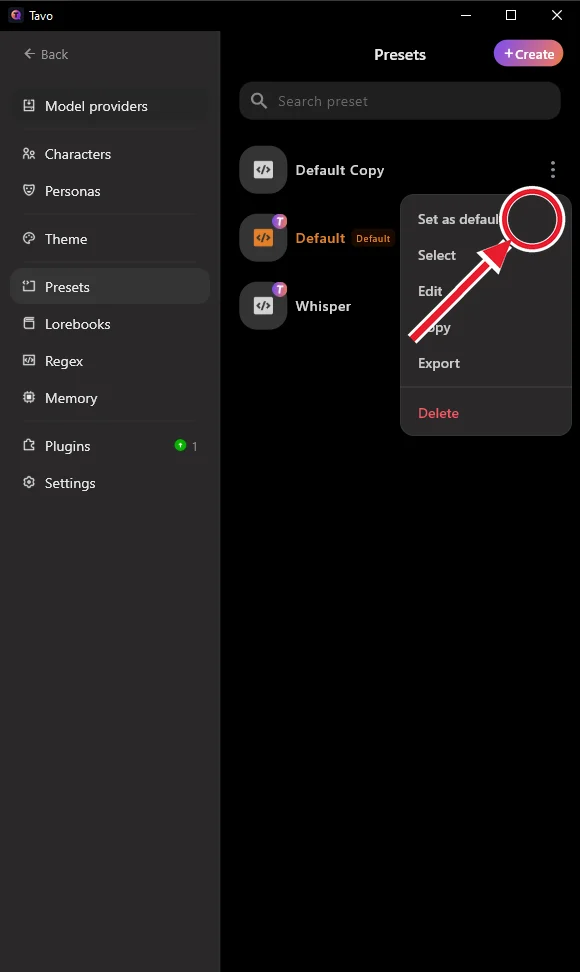
Done. Open a chat and send a message.
Turn on one way only. The preset together with an image plugin gives two images per message.
We went through these steps on 11 November 2026 in TAVO 1.9 on Windows. TAVO looks the same on a phone; if an item is named differently, message support. [Message support →](https://t.me/timmek1)
- You need a strong text model: Claude, Gemini, GPT or DeepSeek. Weak models garble the link and no image appears.
- The model takes the characters’ look from their descriptions and the chat and repeats it in every image.
- With a style, the model puts your artist string at the start of every prompt.
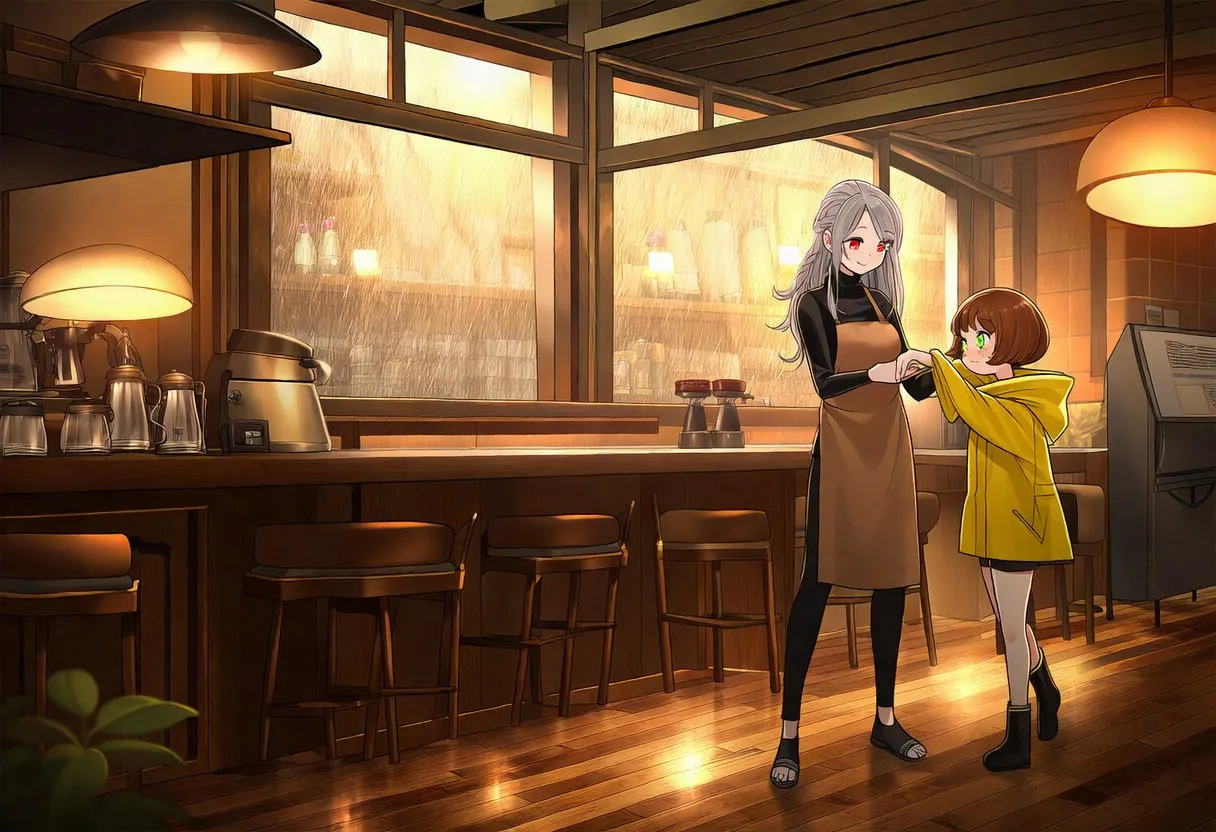
First post
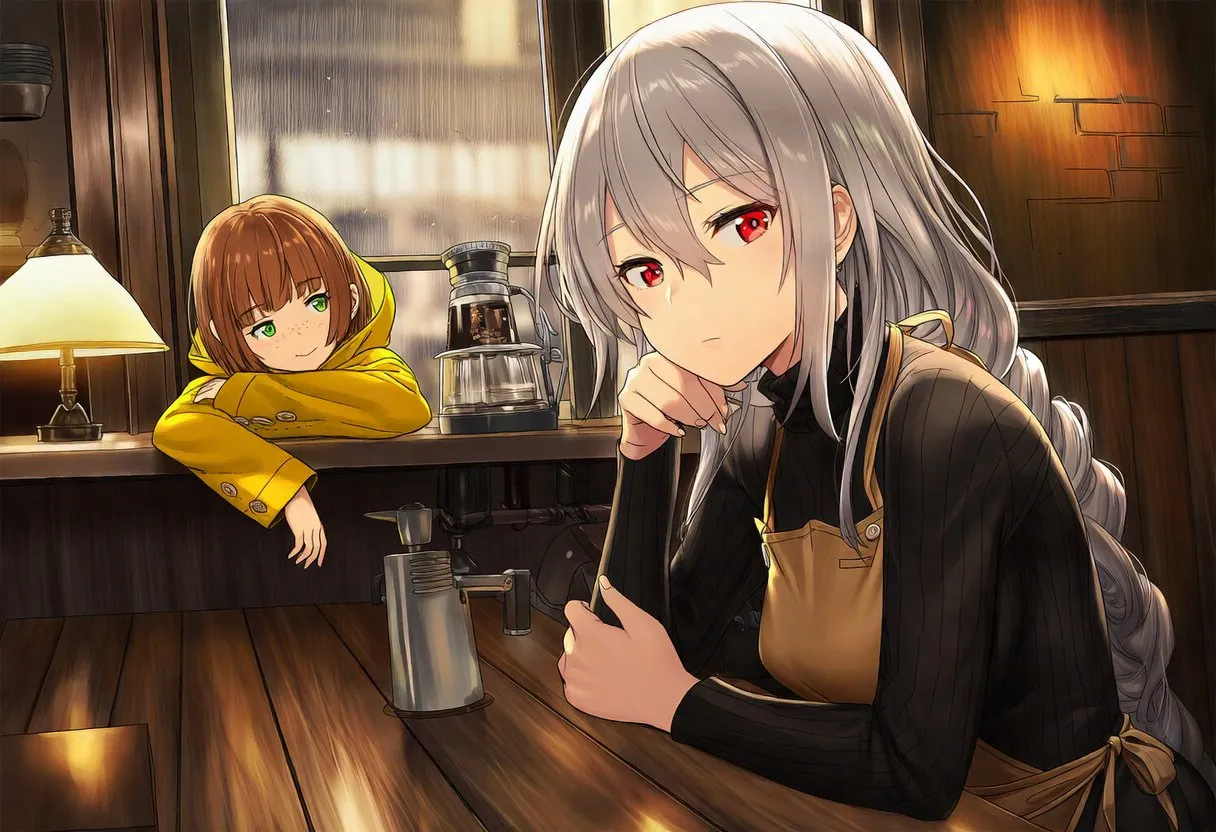
Second post
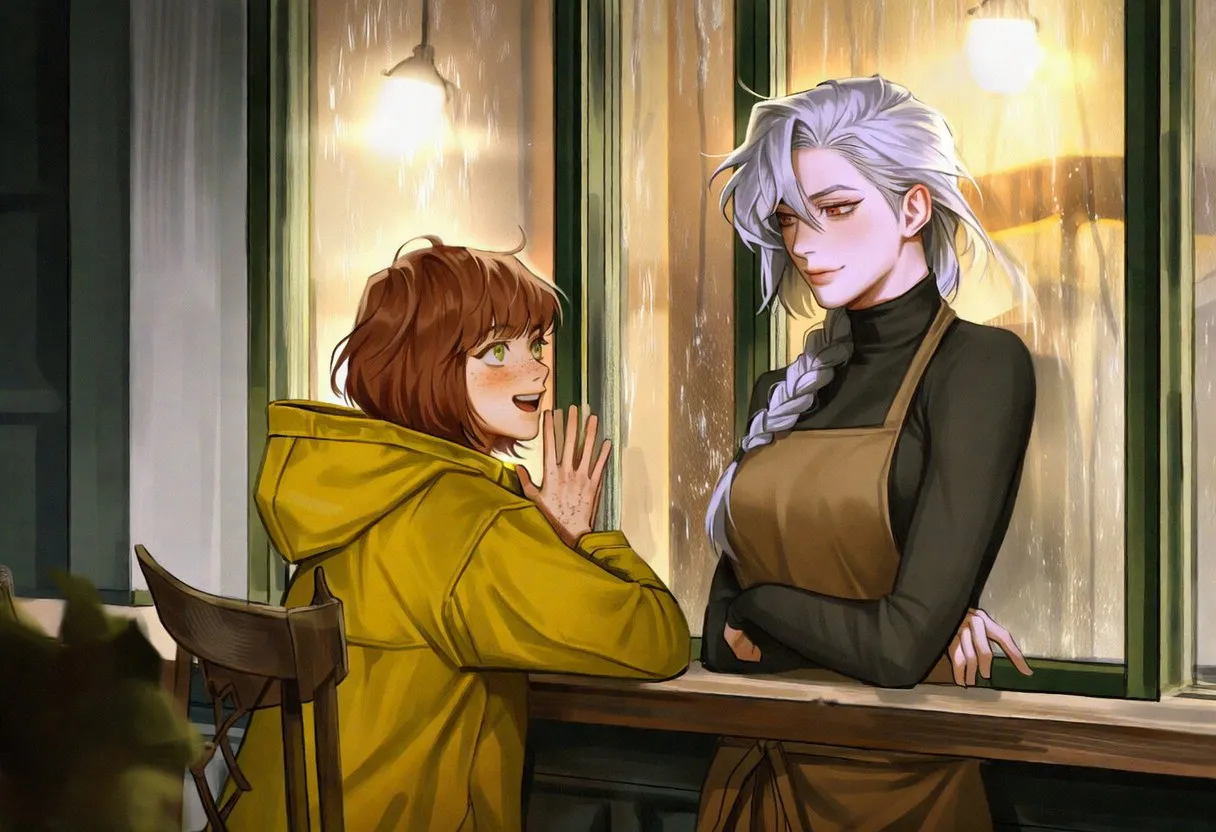
With a style string
Images the text model inserted using the preset: the characters stay the same from post to post.
### How to pick another model
The preset draws with NovelAI V4.5 Full: most community styles are written for it. The other model is NovelAI V5 Full Medium: it is faster (usually 4–6 seconds instead of about 14), but takes two images of the daily limit instead of one, and a style written for V4.5 looks different on it.
Pick a model and copy the preset again — the model is already written into its text:
Model
NovelAI V4.5 FullNovelAI V5 Full Medium
The key and the style come from the fields at the top of the page. If you have not set up the preset yet, follow the same “Where to paste it in TAVO” steps.
#### The preset is already in TAVO: replace its text
In TAVO, open the ☰ menu → **More** → **Presets** (steps 1 and 2 above). Then:
1. Press the **three dots** next to your preset, for example **Default Copy**. 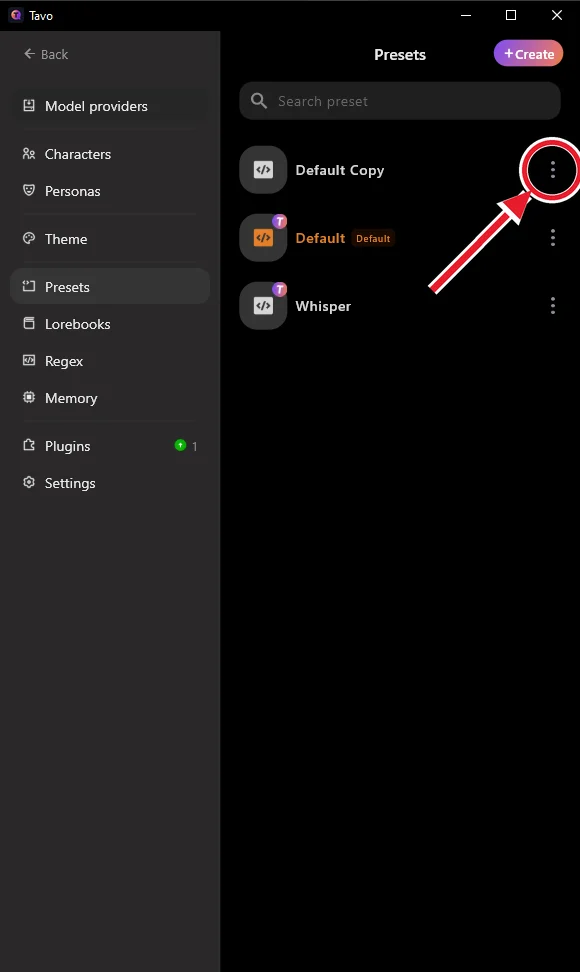
2. Choose **Edit**. 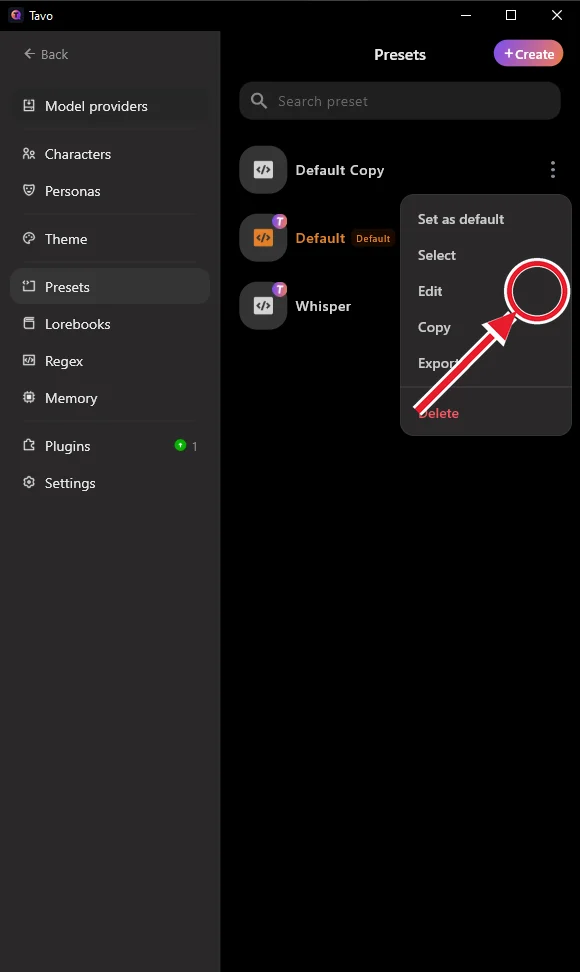
3. In the **Images** row, press the **pencil**. 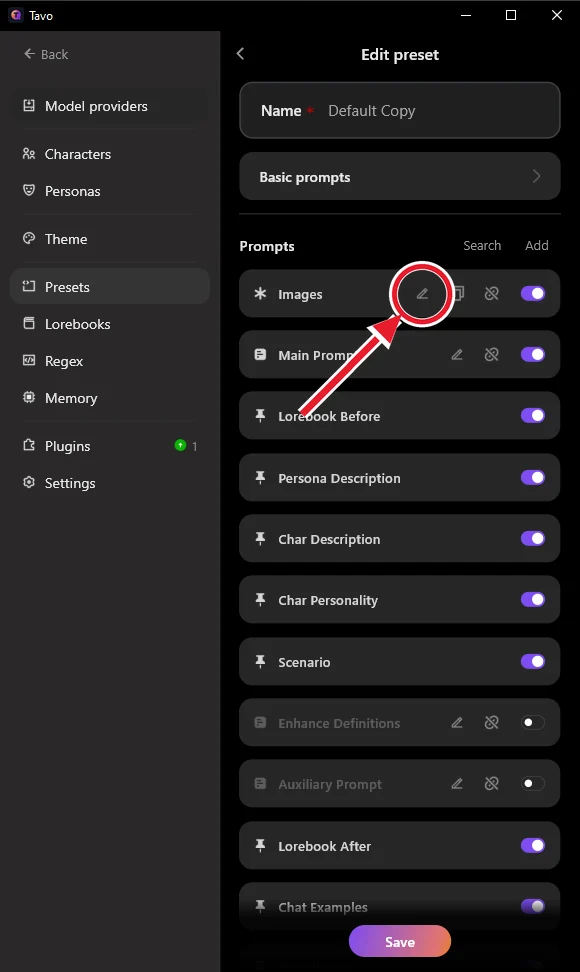
4. Press the **Content** field and erase all the old text: select all of it and delete. 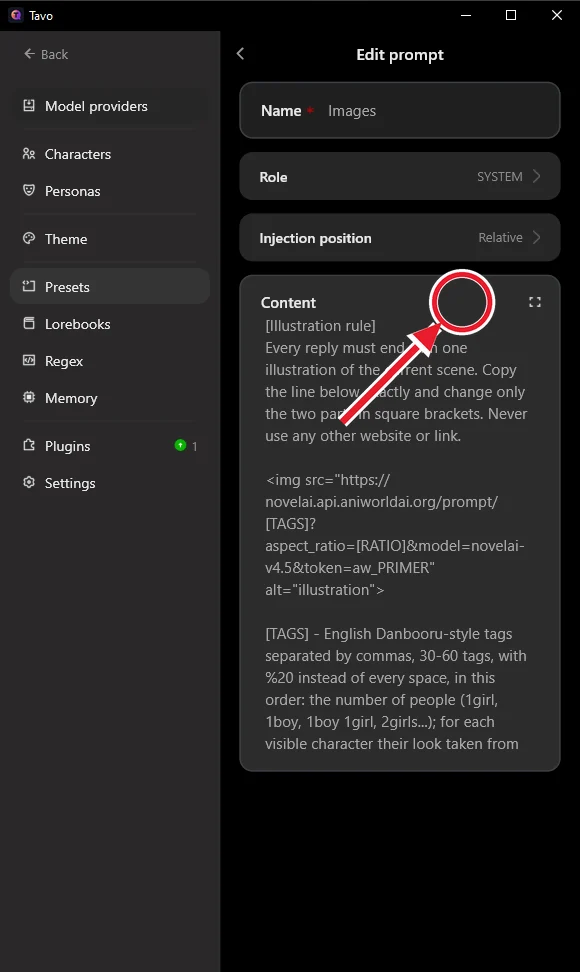
5. Paste the copied preset into the empty field. The counter at the bottom right will show about 1,500 characters. If it shows about 3,000, the old text is still there: erase everything and paste again. 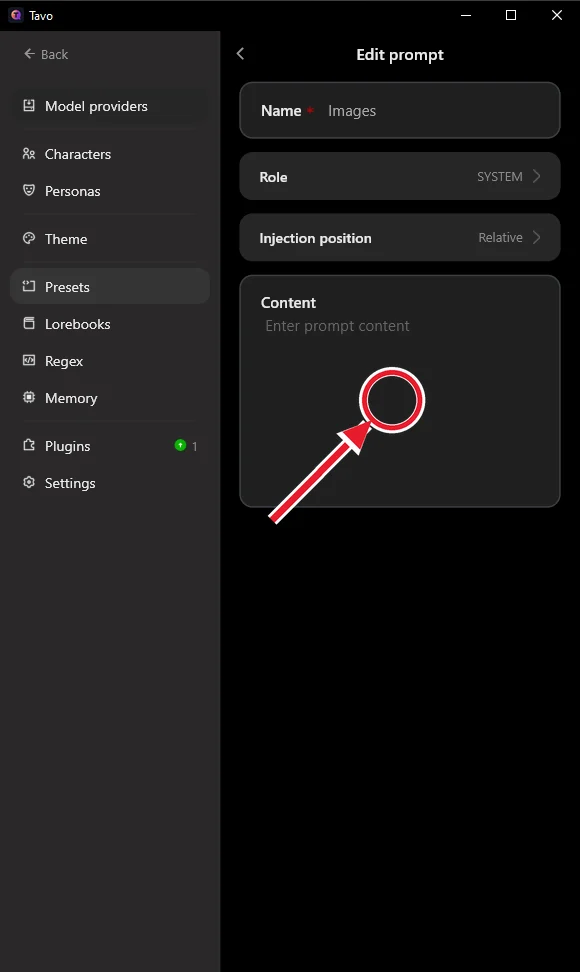
6. Press the **‹** arrow at the top. 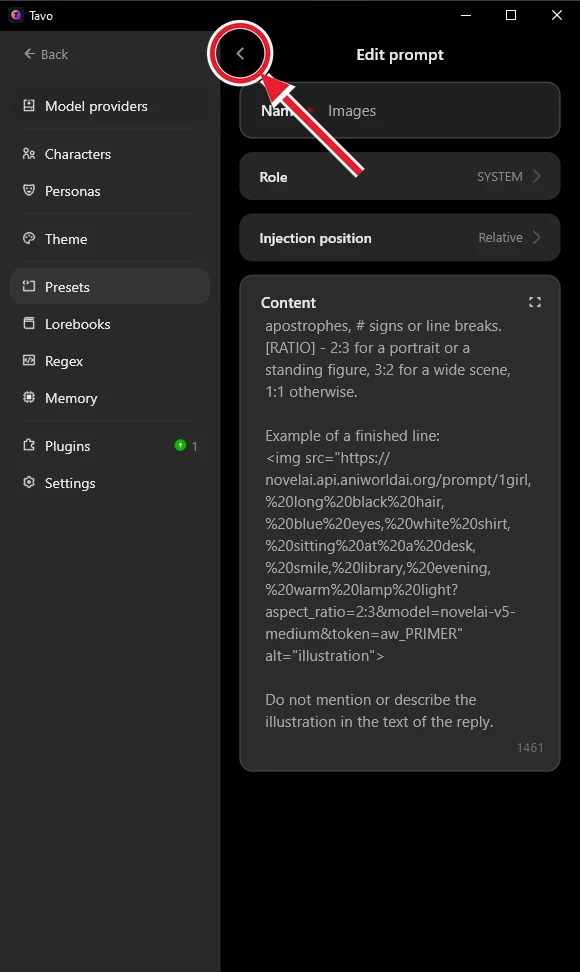
7. Press **Save** at the bottom. You will see “Default Copy saved”, and the next image in the chat is drawn with the new model. 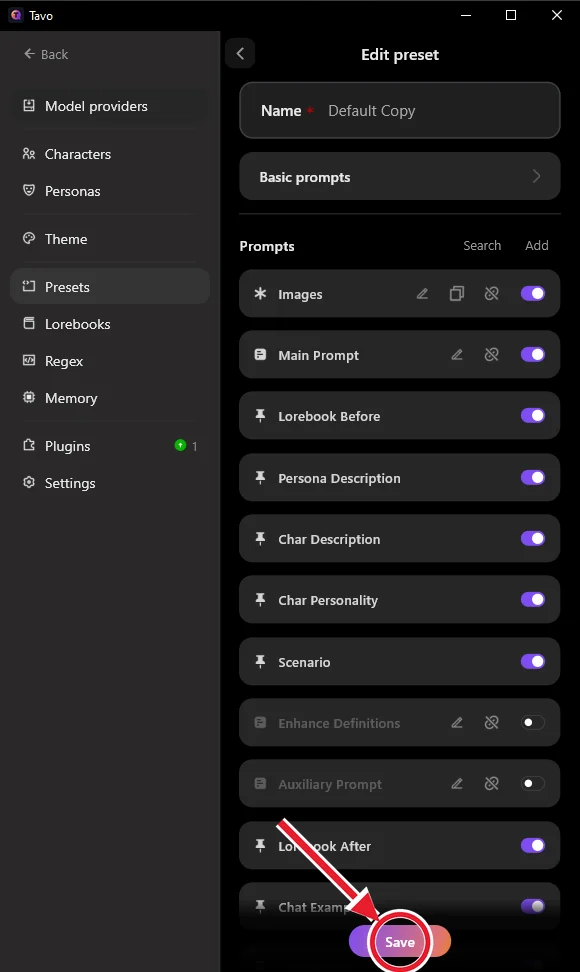
We went through these steps on 13 November 2026 in TAVO 1.9 on Windows. [Message support →](https://t.me/timmek1)
Questions
## FAQ
Do I need an image plugin?
No. The text model inserts an image link into its reply, and our API answers that link with an image.
Which text model works?
A strong one: Claude, Gemini, GPT or DeepSeek. Weak models garble the link and no image appears.
Is my key visible in the preset?
Yes: the key sits in the preset text and in post links. Do not publish the preset or screenshots with it; if the key leaks, issue a new one in your account.
Guides
## Every use case, step by step
[
### NovelAI API: Python, JavaScript and curl examples
For those who write code: URLs, examples in Python, JavaScript and curl, and the docs.
](https://novelai.aniworldai.org/en/api)[
### NovelAI in SillyTavern: setup with screenshots
Standard method and sillyimages: separate instructions, screenshots and copyable settings.
](https://novelai.aniworldai.org/en/sillytavern)[
### NovelAI in TAVO
TAVO’s built-in generator: API URL, key, models, your own style, image by link for presets and Smart expand.
](https://novelai.aniworldai.org/en/tavo)[
### NovelAI API pricing
Plus, Duke and Emperor for 30 days: how many NovelAI, Qwen-Image and FLUX images each includes, renewal and plan changes.
](https://novelai.aniworldai.org/en/pricing)[
### NovelAI from Russia: pay by SBP, no VPN
Pay by SBP, crypto or Telegram Stars, works without a VPN, no NovelAI account needed.
](https://novelai.aniworldai.org/en/russia)[
### Characters’ look from avatars
The “Images by Not\_Found” plugin for TAVO: how to take the characters’ look from avatars, one model and five steps.
](https://novelai.aniworldai.org/en/refs)[
### Images in TAVO: the fastest way
The fastest way: NovelAI images in TAVO in nine steps, with screenshots and arrows.
](https://novelai.aniworldai.org/en/fast)[
### Setup help
Answer one to three questions and get the guide for your case.
](https://novelai.aniworldai.org/en/help)[
### NovelAI images in your roleplay chats
TAVO and SillyTavern. No VPN and no NovelAI account. Three images are free.
](https://novelai.aniworldai.org/en)